
 Fig. 1
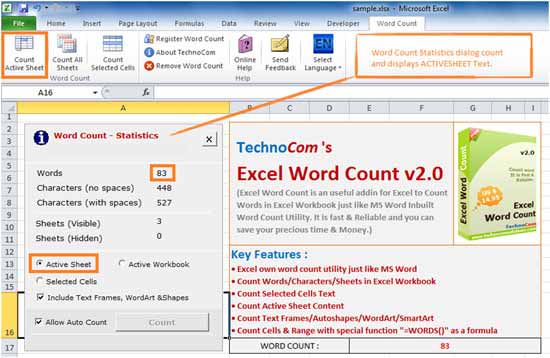 Fig .2
Count all Worksheet:
This tool is used to show statistics of All Worksheets of Workbook. Excel Word Count Also display
statistics for Visible Sheets and Hidden Sheets of a Workbook. Count All
Sheets : If you want to Count All Sheets of Active Workbook, Just click it to open
“Word Count – Statistics” Dialog Box. (See Fig. 3)
Fig .2
Count all Worksheet:
This tool is used to show statistics of All Worksheets of Workbook. Excel Word Count Also display
statistics for Visible Sheets and Hidden Sheets of a Workbook. Count All
Sheets : If you want to Count All Sheets of Active Workbook, Just click it to open
“Word Count – Statistics” Dialog Box. (See Fig. 3)
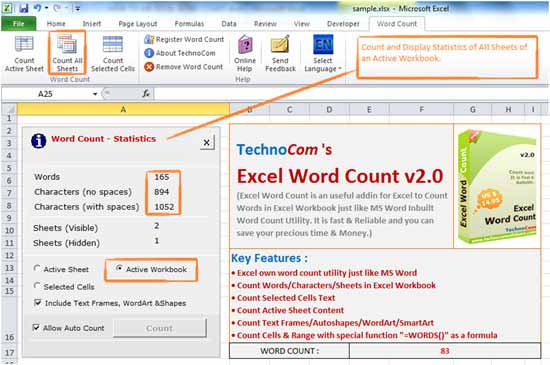 Fig .3
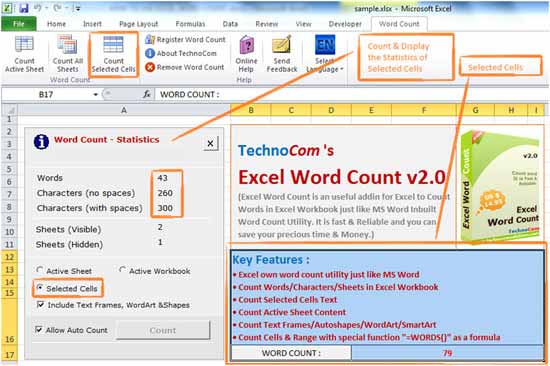 Fig .4
Excel Word Count Also display statistics for Visible Sheets and Hidden Sheets of a Workbook.
Word Count – Statistics : Once you open Word Count
– Statistics dialog box, you can click on Radio Button to get statistics for Active Sheet,
Active Workbook & Selected Cells.
Excel Word Count is introducing two new features which can help you to Count Words
& Custom Lines via Formula. First is “=WORDS()” formula, just type this formula in
any cells and select range of cells to get the word count.
Fig .4
Excel Word Count Also display statistics for Visible Sheets and Hidden Sheets of a Workbook.
Word Count – Statistics : Once you open Word Count
– Statistics dialog box, you can click on Radio Button to get statistics for Active Sheet,
Active Workbook & Selected Cells.
Excel Word Count is introducing two new features which can help you to Count Words
& Custom Lines via Formula. First is “=WORDS()” formula, just type this formula in
any cells and select range of cells to get the word count.
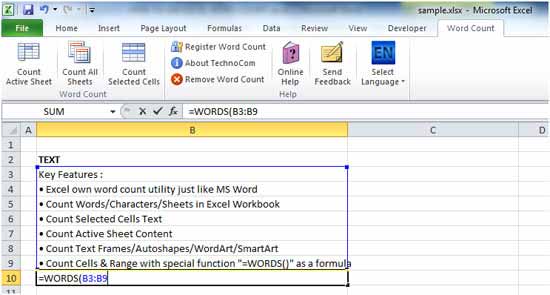 Fig .5
Copyright © 2019 Technocomsoft | Powered by Technocom Solutions
↑